AI Recruiting Software Features: A Buyer’s Checklist
Buying recruiting software is easy. Choosing the right features is where hiring teams make expensive mistakes.
Many teams in India already have resumes, job boards, spreadsheets, and an ATS. But they still struggle with slow screening, weak shortlists, delayed interviews, and unclear hiring reports.
That is why AI recruiting software features matter. The right platform should not only store candidates. It should help recruiters screen, score, assess, interview, compare, and report with less manual work.
LinkedIn says AI is helping recruiters streamline repetitive tasks and focus more on strategic hiring work [LinkedIn, 2025]. SHRM also reports that AI can support recruiting by reducing repetitive work while keeping human judgment central [SHRM, 2025].
For a full category overview, read AI Recruiting Software: The Complete Guide (2026)
What features should you look for in AI recruiting software?
You should look for AI recruiting software features that improve screening speed, candidate quality, recruiter productivity, reporting visibility, and human decision control.
The right feature set depends on your hiring volume, team size, role complexity, and existing tools.
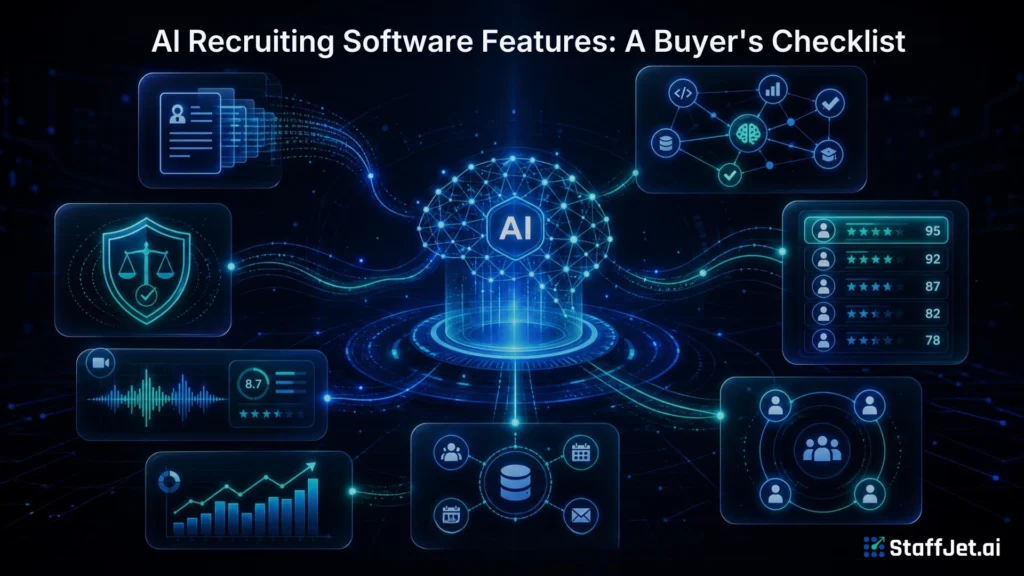
A good hiring software checklist should go beyond basic ATS features. It should include AI resume screening, candidate ranking, assessments, interview scheduling, dashboard reporting, and recruiter review controls.
StaffJet is an AI-powered recruiting platform built around this end-to-end hiring workflow.
Why do businesses need AI recruiting software instead of basic hiring tools?
Businesses need AI recruiting software when basic hiring tools can store applicants but cannot help recruiters screen, rank, assess, and compare candidates faster.
Traditional tools often manage records. They may not improve decision speed.
Hiring teams now need systems that reduce manual screening, support structured evaluation, and make candidate data easier to compare.
SHRM found that organizations using AI in HR report benefits such as lower recruiting costs and better ability to identify top candidates [SHRM, 2025].
As an AI recruiting platform, StaffJet is designed to support hiring decisions, not only applicant storage.
AI Recruiting Software Buyer’s Checklist: 12 Essential Features
An AI recruiting software buyer’s checklist should include screening, ranking, scheduling, interviews, assessments, integrations, automation, analytics, CRM, security, mobile access, and scalability.
Use this section as a practical evaluation framework before talking to vendors.
1. AI Resume Screening
AI resume screening is one of the most important AI hiring features.
It should automatically screen resumes, compare profiles with job requirements, and reduce manual shortlisting. Good screening should include resume parsing and semantic candidate matching, not only keyword matching.
StaffJet AI recruiting software includes AI resume screening and AI profile matching to help recruiters move faster from applications to qualified shortlists.
2. Intelligent Candidate Ranking
Candidate ranking helps recruiters review the strongest applicants first.
The system should rank candidates based on skills, experience, job relevance, assessment results, and fit signals. This helps reduce random review order and improves shortlist consistency.
LinkedIn notes that AI tools can help recruiters analyze resumes and support skills-based hiring [LinkedIn, 2025].
3. Automated Interview Scheduling
Interview scheduling is a core recruitment automation feature.
The platform should coordinate interviews, sync calendars, send reminders, and reduce scheduling delays.
Recruiters should not spend hours chasing availability when the workflow can handle routine coordination.
4. Video Interviewing
Video interviewing helps teams evaluate candidates before deeper hiring manager interviews.
The platform may support one-way video interviews, live interview support, interview recording, and review.
AUTO INTERVIEW must be understood correctly. It is a live interview of 20–30 minutes at a booked time slot, not an on-demand video screening flow.
For more detail, read AI Video Interview Software: Async Screening Explained
5. Skills Assessment
Skills assessment verifies whether a candidate can perform the work.
The platform should support technical assessments, aptitude tests, coding tests, writing tasks, or role-specific evaluations.
This matters because resumes show claims. Assessments add evidence.
AUTO ASSESSMENT is useful when teams want to verify skills before final interview time is used.
6. ATS Integration
ATS integration helps teams connect AI recruiting software with existing applicant tracking systems.
A platform should sync candidate data, hiring stages, notes, reports, and status updates where needed.
This matters for teams that already use an ATS but need stronger AI screening and evaluation.
For comparison context, read AI Recruiting Software vs Traditional ATS
7. Recruitment Workflow Automation
Recruitment workflow automation helps remove repetitive hiring tasks.
This can include automated screening, candidate communication, interview reminders, approval triggers, and dashboard updates.
The goal is not to remove recruiters. The goal is to remove low-value admin work from their day.
LinkedIn reports that generative AI users in talent acquisition saw workload reduction on average in its 2025 recruiting research [LinkedIn, 2025].
8. AI Analytics and Hiring Reports
AI analytics and hiring reports help leaders understand the funnel.
A platform should show recruitment analytics, time-to-hire reports, candidate pipeline analytics, recruiter performance metrics, and reporting dashboards.
This is where AI hiring becomes measurable. Hiring leaders should be able to see where candidates drop, where delays happen, and which roles need attention.
9. Candidate Relationship Management (CRM)
Candidate relationship management helps teams manage talent pools and candidate engagement.
A CRM layer is useful for follow-ups, nurture campaigns, talent rediscovery, and future hiring needs.
Not every company needs a full recruitment CRM on day one. But fast-growing teams should consider it if they hire repeatedly for similar roles.
10. Security and Compliance
Security and compliance protect candidate information.
Teams should check data privacy controls, role-based access, secure candidate information handling, and regional compliance requirements.
Do not assume every platform handles sensitive candidate data the same way. Ask direct questions about storage, access, retention, and audit visibility.
11. Mobile Accessibility
Mobile accessibility helps recruiters and hiring managers review updates faster.
A mobile-friendly dashboard can show candidate status, interview updates, and next actions when teams are away from their desks.
This does not replace full recruiter workflows. It supports faster visibility and follow-up.
12. Scalability and Customization
Scalability and workflow customisation matter when hiring needs grow.
The platform should support custom hiring workflows, multi-location recruitment, role-based access, and API integration where required.
AI recruiting software like StaffJet should be evaluated on whether it can support growth without forcing teams back into spreadsheets.
Which AI recruiting features are most important for different business sizes?
The most important AI recruiting software features depend on whether the buyer is a startup, SMB, enterprise, or staffing agency.
Startups should prioritize AI resume screening, candidate ranking, and easy reporting.
SMBs should add interview scheduling, assessments, and workflow automation.
Enterprises should focus on scalability, analytics, integrations, access controls, and reporting dashboards.
Staffing agencies should prioritize bulk screening, candidate communication, candidate reports, and client-ready visibility.
What common mistakes should buyers avoid when evaluating AI recruiting software?
Buyers should avoid choosing AI recruiting software based only on price, feature lists, demos, or AI claims without testing real hiring workflows.
A low-cost tool can still create hidden recruiter effort.
Common mistakes include ignoring integration capabilities, overlooking scalability, skipping security checks, and not evaluating AI accuracy.
Bias also needs attention. AI can support consistency, but it does not automatically remove bias. Human oversight remains important.
For deeper context, read Does AI Recruiting Software Reduce Hiring Bias?
How can businesses evaluate AI recruiting software before making a purchase?
Businesses should evaluate AI recruiting software by testing real roles, comparing automation quality, reviewing reports, checking support, and estimating ROI.
Request a product demo using your own hiring scenario.
Ask vendors to show how resumes are screened, how candidate rankings are explained, how interviews are managed, and what reports hiring managers receive.
Also ask what makes a good AI recruiting platform for your exact team size and hiring goals.
Before rollout, read How to Implement AI Recruiting Software: A Rollout Guide