See Every Candidate's Journey in One Place

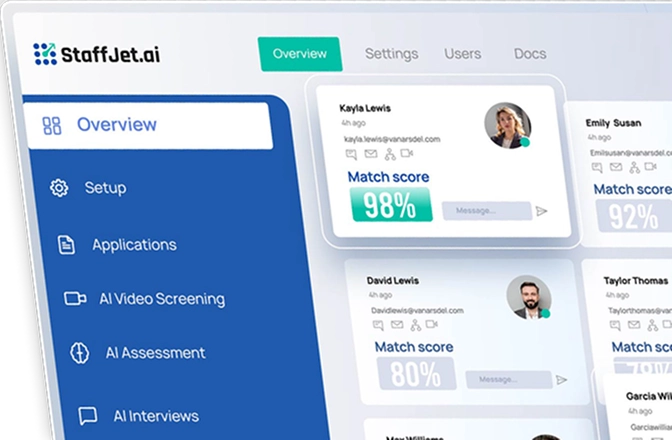
Stop hunting through spreadsheets and email threads. Every candidate’s match score, screening results, assessment performance, and interview summary appears in one unified dashboard you control.

The Candidate Tracking Problem You Face Daily

Your Current Reality

With StaffJet AI

Three Simple Steps to Better Tracking

Candidates Appear Automatically After Applying

When candidates apply and complete any hiring stage, they appear in your dashboard immediately. No manual data entry. No importing spreadsheets. Everything updates automatically as candidates progress.

View Complete Journey and Performance

Click any candidate to see their match score, video screening results, assessment performance, and interview summary. All insights from every stage appear in one organized candidate profile.

Compare and Make Hiring Decisions

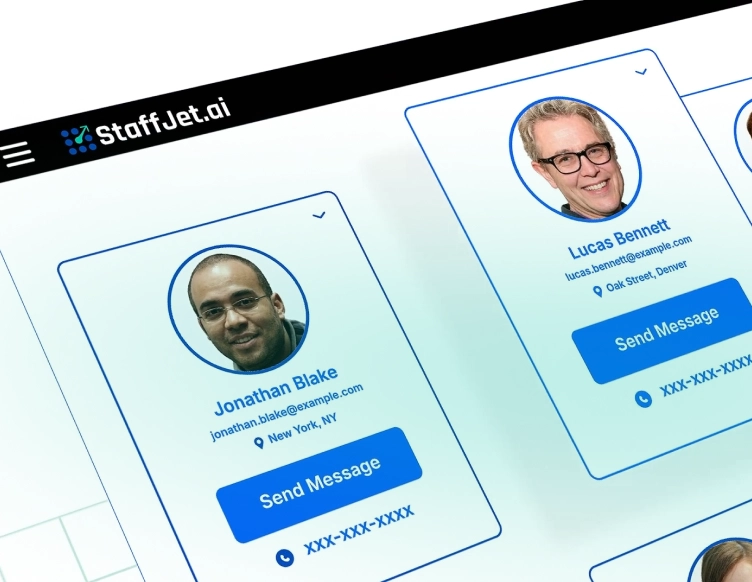
Generate one-click reports showing all candidate insights. Compare multiple candidates side-by-side. Share profiles with team members. Make informed decisions faster.

Real Results From Day One Onward

These aren’t just numbers, they’re hours back in your team’s day, budget freed for growth, and positions filled before competitors finish screening.

2-3x

Faster time to quality hire

30-40%

Lower cost per hire

20-30 hrs

Saved per open role hiring

24 hrs

From job post to shortlist

What You See for Every Candidate

Match Score Tracking

See how well each candidate matches your job requirements. Match scores show technical skills alignment, experience level fit, and overall role suitability instantly.

Screening Details Display

View video screening results, AI evaluation scores, and response summaries. See which candidates passed initial screening and why they qualified.

Assessment Performance Summary

Check coding challenge results, test scores, and skills verification outcomes. See exactly how candidates performed on technical assessments and which areas showed strength.

Interview Summary Access

Read complete interview transcripts and performance summaries. Review depth of knowledge, communication quality, and overall suitability evaluations from AI interviews.

One-Click Report Generation

Generate comprehensive reports containing all insights from every hiring stage. One click produces complete candidate profiles with match scores, screening, assessments, and interviews.

Side-by-Side Candidate Comparison

Compare multiple candidates simultaneously. See how different people performed across all stages. Make faster decisions with clear visual comparisons available instantly.

Stop Losing Candidate Information in Scattered Systems

Criterion Spreadsheet Tracking StaffJet Dashboard
Information location Scattered across multiple tools check Everything in one dashboard
Data updates Manual entry required check Automatic as candidates progress
Candidate journey view Piece together from notes check Complete timeline instantly visible
Team access Share files back-and-forth check Everyone sees same dashboard
Comparison capability Open multiple spreadsheets check Side-by-side with one click
Historical context Lost in old emails check Permanent searchable records
Report generation Copy-paste into documents check One-click comprehensive reports
Finding candidates Search through sheets check Filter and search instantly

Loved by HR Teams, Trusted by Companies

It requires excellent cooperation between multiple departments of the business. And it’s important that everyone involved in a B2B marketing program understand how the system is working

Start With One Role, See Results Immediately

No long commitment required. Set up your first role in minutes & see how fast quality candidates appear in your shortlist within 24 hours.

Common Questions Answered

What information appears in the dashboard?
Every candidate shows their match score, video screening results, assessment performance, interview summary, and overall evaluation. You see their complete journey through your hiring process—which stages they completed, how they performed at each step, and their current status. All insights from AI evaluation appear in one organized profile.
Yes. Share dashboard access with your entire hiring team. Everyone sees the same candidate information in real-time. Add comments, discuss candidates, and collaborate on decisions. Control who has access to which roles. All team members work from identical data rather than scattered notes.
Click the report button on any candidate profile. The system generates a comprehensive document containing their match score, screening details, assessment results, interview transcript, and performance summaries. Everything from every hiring stage appears in one organized report. Share it with stakeholders or download for your records.
The dashboard organizes candidates by role, but you can view and compare anyone. Filter by role, status, match score, or hiring stage. Compare candidates who applied for the same position or review top performers across different roles. The system makes any comparison you need available quickly.
All candidate data remains in your dashboard. Search past candidates anytime. When similar roles open, review previous applicants who were strong but didn’t get hired. Build a searchable talent database over time. Nothing gets deleted unless you choose to remove it.
Yes. Filter by match score, hiring stage, skills, experience level, or any evaluation criteria. Search by name, keywords, or specific qualifications. Create custom views showing only candidates who meet certain thresholds. Save frequently-used filters for quick access.
Status updates automatically as candidates complete each hiring stage. When someone finishes video screening, their status changes immediately. Pass an assessment, the dashboard reflects it instantly. No manual tracking needed. You always see current status for everyone in your pipeline.